 8839075805
Implements Phases 1-8 of the TFTSR implementation plan.

Rust backend (Tauri 2.x, src-tauri/):
- Multi-provider AI: OpenAI-compatible, Anthropic, Gemini, Mistral, Ollama
- PII detection engine: 11 regex patterns with overlap resolution
- SQLCipher AES-256 encrypted database with 10 versioned migrations
- 28 Tauri IPC commands for triage, analysis, document, and system ops
- Ollama: hardware probe, model recommendations, pull/delete with events
- RCA and blameless post-mortem Markdown document generators
- PDF export via printpdf
- Audit log: SHA-256 hash of every external data send
- Integration stubs for Confluence, ServiceNow, Azure DevOps (v0.2)

Frontend (React 18 + TypeScript + Vite, src/):
- 9 pages: full triage workflow NewIssue→LogUpload→Triage→Resolution→RCA→Postmortem→History+Settings
- 7 components: ChatWindow, TriageProgress, PiiDiffViewer, DocEditor, HardwareReport, ModelSelector, UI primitives
- 3 Zustand stores: session, settings (persisted), history
- Type-safe tauriCommands.ts matching Rust backend types exactly
- 8 IT domain system prompts (Linux, Windows, Network, K8s, DB, Virt, HW, Obs)

DevOps:
- .woodpecker/test.yml: rustfmt, clippy, cargo test, tsc, vitest on every push
- .woodpecker/release.yml: linux/amd64 + linux/arm64 builds, Gogs release upload

Verified:
- cargo check: zero errors
- tsc --noEmit: zero errors
- vitest run: 13/13 unit tests passing

Co-Authored-By: Claude Sonnet 4.6 (1M context) <noreply@anthropic.com>
3.6 KiB
@inquirer/rawlist
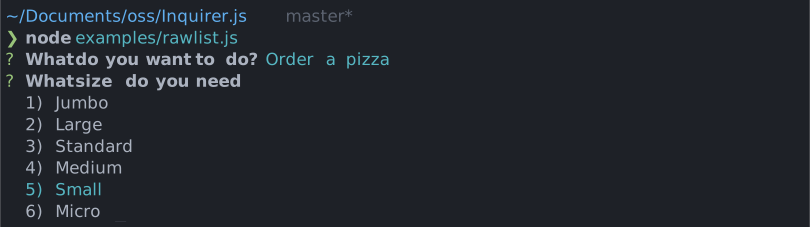
Simple interactive command line prompt to display a raw list of choices (single value select) with minimal interaction.
Installation
| npm | yarn |
|---|---|
|
|
| Or | |
|
|
Usage
import { rawlist } from '@inquirer/prompts';
// Or
// import rawlist from '@inquirer/rawlist';

const answer = await rawlist({
  message: 'Select a package manager',
  choices: [
    { name: 'npm', value: 'npm' },
    { name: 'yarn', value: 'yarn' },
    { name: 'pnpm', value: 'pnpm' },
  ],
});
Options
| Property | Type | Required | Description |
|---|---|---|---|
| message | string |
yes | The question to ask |
| choices | Choice[] |
yes | List of the available choices. |
| loop | boolean |
no | Defaults to true. When set to false, the cursor will be constrained to the top and bottom of the choice list without looping. |
| theme | See Theming | no | Customize look of the prompt. |
Separator objects can be used in the choices array to render non-selectable lines in the choice list. By default it'll render a line, but you can provide the text as argument (new Separator('-- Dependencies --')). This option is often used to add labels to groups within long list of options.
Choice object
The Choice object is typed as
type Choice<Value> = {
  value: Value;
  name?: string;
  short?: string;
  key?: string;
};
Here's each property:
value: The value is what will be returned byawait rawlist().name: This is the string displayed in the choice list.short: Once the prompt is done (press enter), we'll useshortif defined to render next to the question. By default we'll usename.key: The key of the choice. Displayed askey) name.
choices can also be an array of string, in which case the string will be used both as the value and the name.
Theming
You can theme a prompt by passing a theme object option. The theme object only need to includes the keys you wish to modify, we'll fallback on the defaults for the rest.
type Theme = {
  prefix: string | { idle: string; done: string };
  spinner: {
    interval: number;
    frames: string[];
  };
  style: {
    answer: (text: string) => string;
    message: (text: string, status: 'idle' | 'done' | 'loading') => string;
    error: (text: string) => string;
    highlight: (text: string) => string;
  };
};
License
Copyright (c) 2023 Simon Boudrias (twitter: @vaxilart)
Licensed under the MIT license.