125 lines
3.6 KiB
Markdown
125 lines
3.6 KiB
Markdown

|
# `@inquirer/rawlist`
|
||
|
|
|
||
|
|
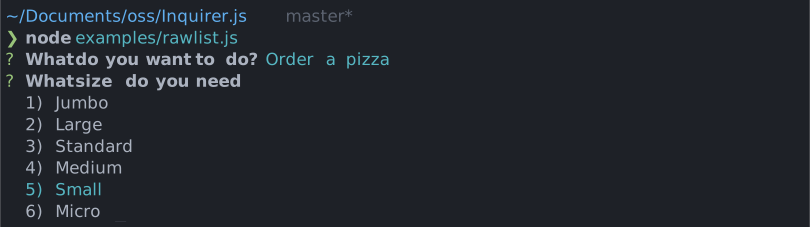
Simple interactive command line prompt to display a raw list of choices (single value select) with minimal interaction.
|
||
|
|
|
||
|
|
|
||
|
|
|
||
|
|
# Installation
|
||
|
|
|
||
|
|
<table>
|
||
|
|
<tr>
|
||
|
|
<th>npm</th>
|
||
|
|
<th>yarn</th>
|
||
|
|
</tr>
|
||
|
|
<tr>
|
||
|
|
<td>
|
||
|
|
|
||
|
|
```sh
|
||
|
|
npm install @inquirer/prompts
|
||
|
|
```
|
||
|
|
|
||
|
|
</td>
|
||
|
|
<td>
|
||
|
|
|
||
|
|
```sh
|
||
|
|
yarn add @inquirer/prompts
|
||
|
|
```
|
||
|
|
|
||
|
|
</td>
|
||
|
|
</tr>
|
||
|
|
<tr>
|
||
|
|
<td colSpan="2" align="center">Or</td>
|
||
|
|
</tr>
|
||
|
|
<tr>
|
||
|
|
<td>
|
||
|
|
|
||
|
|
```sh
|
||
|
|
npm install @inquirer/rawlist
|
||
|
|
```
|
||
|
|
|
||
|
|
</td>
|
||
|
|
<td>
|
||
|
|
|
||
|
|
```sh
|
||
|
|
yarn add @inquirer/rawlist
|
||
|
|
```
|
||
|
|
|
||
|
|
</td>
|
||
|
|
</tr>
|
||
|
|
</table>
|
||
|
|
|
||
|
|
# Usage
|
||
|
|
|
||
|
|
```js
|
||
|
|
import { rawlist } from '@inquirer/prompts';
|
||
|
|
// Or
|
||
|
|
// import rawlist from '@inquirer/rawlist';
|
||
|
|
|
||
|
|
const answer = await rawlist({
|
||
|
|
message: 'Select a package manager',
|
||
|
|
choices: [
|
||
|
|
{ name: 'npm', value: 'npm' },
|
||
|
|
{ name: 'yarn', value: 'yarn' },
|
||
|
|
{ name: 'pnpm', value: 'pnpm' },
|
||
|
|
],
|
||
|
|
});
|
||
|
|
```
|
||
|
|
|
||
|
|
## Options
|
||
|
|
|
||
|
|
| Property | Type | Required | Description |
|
||
|
|
| -------- | ----------------------- | -------- | --------------------------------------------------------------------------------------------------------------------------------- |
|
||
|
|
| message | `string` | yes | The question to ask |
|
||
|
|
| choices | `Choice[]` | yes | List of the available choices. |
|
||
|
|
| loop | `boolean` | no | Defaults to `true`. When set to `false`, the cursor will be constrained to the top and bottom of the choice list without looping. |
|
||
|
|
| theme | [See Theming](#Theming) | no | Customize look of the prompt. |
|
||
|
|
|
||
|
|
`Separator` objects can be used in the `choices` array to render non-selectable lines in the choice list. By default it'll render a line, but you can provide the text as argument (`new Separator('-- Dependencies --')`). This option is often used to add labels to groups within long list of options.
|
||
|
|
|
||
|
|
### `Choice` object
|
||
|
|
|
||
|
|
The `Choice` object is typed as
|
||
|
|
|
||
|
|
```ts
|
||
|
|
type Choice<Value> = {
|
||
|
|
value: Value;
|
||
|
|
name?: string;
|
||
|
|
short?: string;
|
||
|
|
key?: string;
|
||
|
|
};
|
||
|
|
```
|
||
|
|
|
||
|
|
Here's each property:
|
||
|
|
|
||
|
|
- `value`: The value is what will be returned by `await rawlist()`.
|
||
|
|
- `name`: This is the string displayed in the choice list.
|
||
|
|
- `short`: Once the prompt is done (press enter), we'll use `short` if defined to render next to the question. By default we'll use `name`.
|
||
|
|
- `key`: The key of the choice. Displayed as `key) name`.
|
||
|
|
|
||
|
|
`choices` can also be an array of string, in which case the string will be used both as the `value` and the `name`.
|
||
|
|
|
||
|
|
## Theming
|
||
|
|
|
||
|
|
You can theme a prompt by passing a `theme` object option. The theme object only need to includes the keys you wish to modify, we'll fallback on the defaults for the rest.
|
||
|
|
|
||
|
|
```ts
|
||
|
|
type Theme = {
|
||
|
|
prefix: string | { idle: string; done: string };
|
||
|
|
spinner: {
|
||
|
|
interval: number;
|
||
|
|
frames: string[];
|
||
|
|
};
|
||
|
|
style: {
|
||
|
|
answer: (text: string) => string;
|
||
|
|
message: (text: string, status: 'idle' | 'done' | 'loading') => string;
|
||
|
|
error: (text: string) => string;
|
||
|
|
highlight: (text: string) => string;
|
||
|
|
};
|
||
|
|
};
|
||
|
|
```
|
||
|
|
|
||
|
|
# License
|
||
|
|
|
||
|
|
Copyright (c) 2023 Simon Boudrias (twitter: [@vaxilart](https://twitter.com/Vaxilart))<br/>
|
||
|
|
Licensed under the MIT license.
|