 8839075805
Implements Phases 1-8 of the TFTSR implementation plan.

Rust backend (Tauri 2.x, src-tauri/):
- Multi-provider AI: OpenAI-compatible, Anthropic, Gemini, Mistral, Ollama
- PII detection engine: 11 regex patterns with overlap resolution
- SQLCipher AES-256 encrypted database with 10 versioned migrations
- 28 Tauri IPC commands for triage, analysis, document, and system ops
- Ollama: hardware probe, model recommendations, pull/delete with events
- RCA and blameless post-mortem Markdown document generators
- PDF export via printpdf
- Audit log: SHA-256 hash of every external data send
- Integration stubs for Confluence, ServiceNow, Azure DevOps (v0.2)

Frontend (React 18 + TypeScript + Vite, src/):
- 9 pages: full triage workflow NewIssue→LogUpload→Triage→Resolution→RCA→Postmortem→History+Settings
- 7 components: ChatWindow, TriageProgress, PiiDiffViewer, DocEditor, HardwareReport, ModelSelector, UI primitives
- 3 Zustand stores: session, settings (persisted), history
- Type-safe tauriCommands.ts matching Rust backend types exactly
- 8 IT domain system prompts (Linux, Windows, Network, K8s, DB, Virt, HW, Obs)

DevOps:
- .woodpecker/test.yml: rustfmt, clippy, cargo test, tsc, vitest on every push
- .woodpecker/release.yml: linux/amd64 + linux/arm64 builds, Gogs release upload

Verified:
- cargo check: zero errors
- tsc --noEmit: zero errors
- vitest run: 13/13 unit tests passing

Co-Authored-By: Claude Sonnet 4.6 (1M context) <noreply@anthropic.com>
182 lines
5.7 KiB
Markdown
182 lines
5.7 KiB
Markdown
# `@inquirer/select`
|
|
|
|
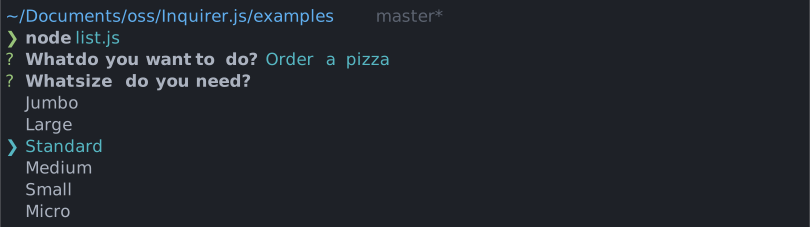
Simple interactive command line prompt to display a list of choices (single select.)
|
|
|
|
|
|
|
|
# Installation
|
|
|
|
<table>
|
|
<tr>
|
|
<th>npm</th>
|
|
<th>yarn</th>
|
|
</tr>
|
|
<tr>
|
|
<td>
|
|
|
|
```sh
|
|
npm install @inquirer/prompts
|
|
```
|
|
|
|
</td>
|
|
<td>
|
|
|
|
```sh
|
|
yarn add @inquirer/prompts
|
|
```
|
|
|
|
</td>
|
|
</tr>
|
|
<tr>
|
|
<td colSpan="2" align="center">Or</td>
|
|
</tr>
|
|
<tr>
|
|
<td>
|
|
|
|
```sh
|
|
npm install @inquirer/select
|
|
```
|
|
|
|
</td>
|
|
<td>
|
|
|
|
```sh
|
|
yarn add @inquirer/select
|
|
```
|
|
|
|
</td>
|
|
</tr>
|
|
</table>
|
|
|
|
# Usage
|
|
|
|
```js
|
|
import { select, Separator } from '@inquirer/prompts';
|
|
// Or
|
|
// import select, { Separator } from '@inquirer/select';
|
|
|
|
const answer = await select({
|
|
message: 'Select a package manager',
|
|
choices: [
|
|
{
|
|
name: 'npm',
|
|
value: 'npm',
|
|
description: 'npm is the most popular package manager',
|
|
},
|
|
{
|
|
name: 'yarn',
|
|
value: 'yarn',
|
|
description: 'yarn is an awesome package manager',
|
|
},
|
|
new Separator(),
|
|
{
|
|
name: 'jspm',
|
|
value: 'jspm',
|
|
disabled: true,
|
|
},
|
|
{
|
|
name: 'pnpm',
|
|
value: 'pnpm',
|
|
disabled: '(pnpm is not available)',
|
|
},
|
|
],
|
|
});
|
|
```
|
|
|
|
## Options
|
|
|
|
| Property | Type | Required | Description |
|
|
| -------- | ----------------------- | -------- | ------------------------------------------------------------------------------------------------------------------------------------------- |
|
|
| message | `string` | yes | The question to ask |
|
|
| choices | `Choice[]` | yes | List of the available choices. |
|
|
| default | `string` | no | Defines in front of which item the cursor will initially appear. When omitted, the cursor will appear on the first selectable item. |
|
|
| pageSize | `number` | no | By default, lists of choice longer than 7 will be paginated. Use this option to control how many choices will appear on the screen at once. |
|
|
| loop | `boolean` | no | Defaults to `true`. When set to `false`, the cursor will be constrained to the top and bottom of the choice list without looping. |
|
|
| theme | [See Theming](#Theming) | no | Customize look of the prompt. |
|
|
|
|
`Separator` objects can be used in the `choices` array to render non-selectable lines in the choice list. By default it'll render a line, but you can provide the text as argument (`new Separator('-- Dependencies --')`). This option is often used to add labels to groups within long list of options.
|
|
|
|
### `Choice` object
|
|
|
|
The `Choice` object is typed as
|
|
|
|
```ts
|
|
type Choice<Value> = {
|
|
value: Value;
|
|
name?: string;
|
|
description?: string;
|
|
short?: string;
|
|
disabled?: boolean | string;
|
|
};
|
|
```
|
|
|
|
Here's each property:
|
|
|
|
- `value`: The value is what will be returned by `await select()`.
|
|
- `name`: This is the string displayed in the choice list.
|
|
- `description`: Option for a longer description string that'll appear under the list when the cursor highlight a given choice.
|
|
- `short`: Once the prompt is done (press enter), we'll use `short` if defined to render next to the question. By default we'll use `name`.
|
|
- `disabled`: Disallow the option from being selected. If `disabled` is a string, it'll be used as a help tip explaining why the choice isn't available.
|
|
|
|
`choices` can also be an array of string, in which case the string will be used both as the `value` and the `name`.
|
|
|
|
## Theming
|
|
|
|
You can theme a prompt by passing a `theme` object option. The theme object only need to includes the keys you wish to modify, we'll fallback on the defaults for the rest.
|
|
|
|
```ts
|
|
type Theme = {
|
|
prefix: string | { idle: string; done: string };
|
|
spinner: {
|
|
interval: number;
|
|
frames: string[];
|
|
};
|
|
style: {
|
|
answer: (text: string) => string;
|
|
message: (text: string, status: 'idle' | 'done' | 'loading') => string;
|
|
error: (text: string) => string;
|
|
help: (text: string) => string;
|
|
highlight: (text: string) => string;
|
|
description: (text: string) => string;
|
|
disabled: (text: string) => string;
|
|
keysHelpTip: (keys: [key: string, action: string][]) => string | undefined;
|
|
};
|
|
icon: {
|
|
cursor: string;
|
|
};
|
|
indexMode: 'hidden' | 'number';
|
|
};
|
|
```
|
|
|
|
### `theme.style.keysHelpTip`
|
|
|
|
This function allows you to customize the keyboard shortcuts help tip displayed below the prompt. It receives an array of key-action pairs and should return a formatted string. You can also hook here to localize the labels to different languages.
|
|
|
|
It can also returns `undefined` to hide the help tip entirely. This is the replacement for the deprecated theme option `helpMode: 'never'`.
|
|
|
|
```js
|
|
theme: {
|
|
style: {
|
|
keysHelpTip: (keys) => {
|
|
// Return undefined to hide the help tip completely.
|
|
return undefined;
|
|
|
|
// Or customize the formatting. Or localize the labels.
|
|
return keys.map(([key, action]) => `${key}: ${action}`).join(' | ');
|
|
};
|
|
}
|
|
}
|
|
```
|
|
|
|
### `theme.indexMode`
|
|
|
|
Controls how indices are displayed before each choice:
|
|
|
|
- `hidden` (default): No indices are shown
|
|
- `number`: Display a number before each choice (e.g. "1. Option A")
|
|
|
|
# License
|
|
|
|
Copyright (c) 2023 Simon Boudrias (twitter: [@vaxilart](https://twitter.com/Vaxilart))<br/>
|
|
Licensed under the MIT license.
|