 8839075805
Implements Phases 1-8 of the TFTSR implementation plan.

Rust backend (Tauri 2.x, src-tauri/):
- Multi-provider AI: OpenAI-compatible, Anthropic, Gemini, Mistral, Ollama
- PII detection engine: 11 regex patterns with overlap resolution
- SQLCipher AES-256 encrypted database with 10 versioned migrations
- 28 Tauri IPC commands for triage, analysis, document, and system ops
- Ollama: hardware probe, model recommendations, pull/delete with events
- RCA and blameless post-mortem Markdown document generators
- PDF export via printpdf
- Audit log: SHA-256 hash of every external data send
- Integration stubs for Confluence, ServiceNow, Azure DevOps (v0.2)

Frontend (React 18 + TypeScript + Vite, src/):
- 9 pages: full triage workflow NewIssue→LogUpload→Triage→Resolution→RCA→Postmortem→History+Settings
- 7 components: ChatWindow, TriageProgress, PiiDiffViewer, DocEditor, HardwareReport, ModelSelector, UI primitives
- 3 Zustand stores: session, settings (persisted), history
- Type-safe tauriCommands.ts matching Rust backend types exactly
- 8 IT domain system prompts (Linux, Windows, Network, K8s, DB, Virt, HW, Obs)

DevOps:
- .woodpecker/test.yml: rustfmt, clippy, cargo test, tsc, vitest on every push
- .woodpecker/release.yml: linux/amd64 + linux/arm64 builds, Gogs release upload

Verified:
- cargo check: zero errors
- tsc --noEmit: zero errors
- vitest run: 13/13 unit tests passing

Co-Authored-By: Claude Sonnet 4.6 (1M context) <noreply@anthropic.com>
94 lines
3.3 KiB
Markdown
94 lines
3.3 KiB
Markdown
# `@inquirer/password`
|
|
|
|
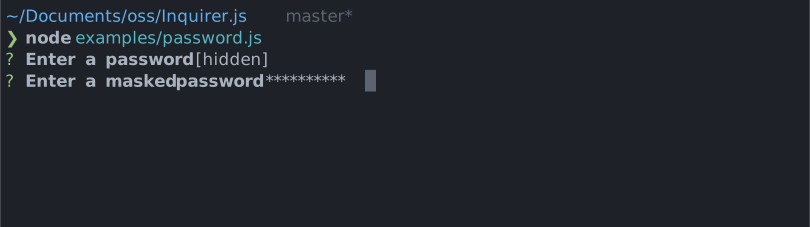
Interactive password input component for command line interfaces. Supports input validation and masked or transparent modes.
|
|
|
|
|
|
|
|
# Installation
|
|
|
|
<table>
|
|
<tr>
|
|
<th>npm</th>
|
|
<th>yarn</th>
|
|
</tr>
|
|
<tr>
|
|
<td>
|
|
|
|
```sh
|
|
npm install @inquirer/prompts
|
|
```
|
|
|
|
</td>
|
|
<td>
|
|
|
|
```sh
|
|
yarn add @inquirer/prompts
|
|
```
|
|
|
|
</td>
|
|
</tr>
|
|
<tr>
|
|
<td colSpan="2" align="center">Or</td>
|
|
</tr>
|
|
<tr>
|
|
<td>
|
|
|
|
```sh
|
|
npm install @inquirer/password
|
|
```
|
|
|
|
</td>
|
|
<td>
|
|
|
|
```sh
|
|
yarn add @inquirer/password
|
|
```
|
|
|
|
</td>
|
|
</tr>
|
|
</table>
|
|
|
|
# Usage
|
|
|
|
```js
|
|
import { password } from '@inquirer/prompts';
|
|
// Or
|
|
// import password from '@inquirer/password';
|
|
|
|
const answer = await password({ message: 'Enter your name' });
|
|
```
|
|
|
|
## Options
|
|
|
|
| Property | Type | Required | Description |
|
|
| -------- | ----------------------------------------------------------- | -------- | ----------------------------------------------------------------------------------------------------------------------------------------------------------------------------------------------------------------------- |
|
|
| message | `string` | yes | The question to ask |
|
|
| mask | `boolean` | no | Show a `*` mask over the input or keep it transparent |
|
|
| validate | `string => boolean \| string \| Promise<boolean \| string>` | no | On submit, validate the filtered answered content. When returning a string, it'll be used as the error message displayed to the user. Note: returning a rejected promise, we'll assume a code error happened and crash. |
|
|
| theme | [See Theming](#Theming) | no | Customize look of the prompt. |
|
|
|
|
## Theming
|
|
|
|
You can theme a prompt by passing a `theme` object option. The theme object only need to includes the keys you wish to modify, we'll fallback on the defaults for the rest.
|
|
|
|
```ts
|
|
type Theme = {
|
|
prefix: string | { idle: string; done: string };
|
|
spinner: {
|
|
interval: number;
|
|
frames: string[];
|
|
};
|
|
style: {
|
|
answer: (text: string) => string;
|
|
message: (text: string, status: 'idle' | 'done' | 'loading') => string;
|
|
error: (text: string) => string;
|
|
help: (text: string) => string;
|
|
};
|
|
};
|
|
```
|
|
|
|
# License
|
|
|
|
Copyright (c) 2023 Simon Boudrias (twitter: [@vaxilart](https://twitter.com/Vaxilart))<br/>
|
|
Licensed under the MIT license.
|