
5.0 KiB
Portfolio Optimization Notebook on DGX Spark
Overview
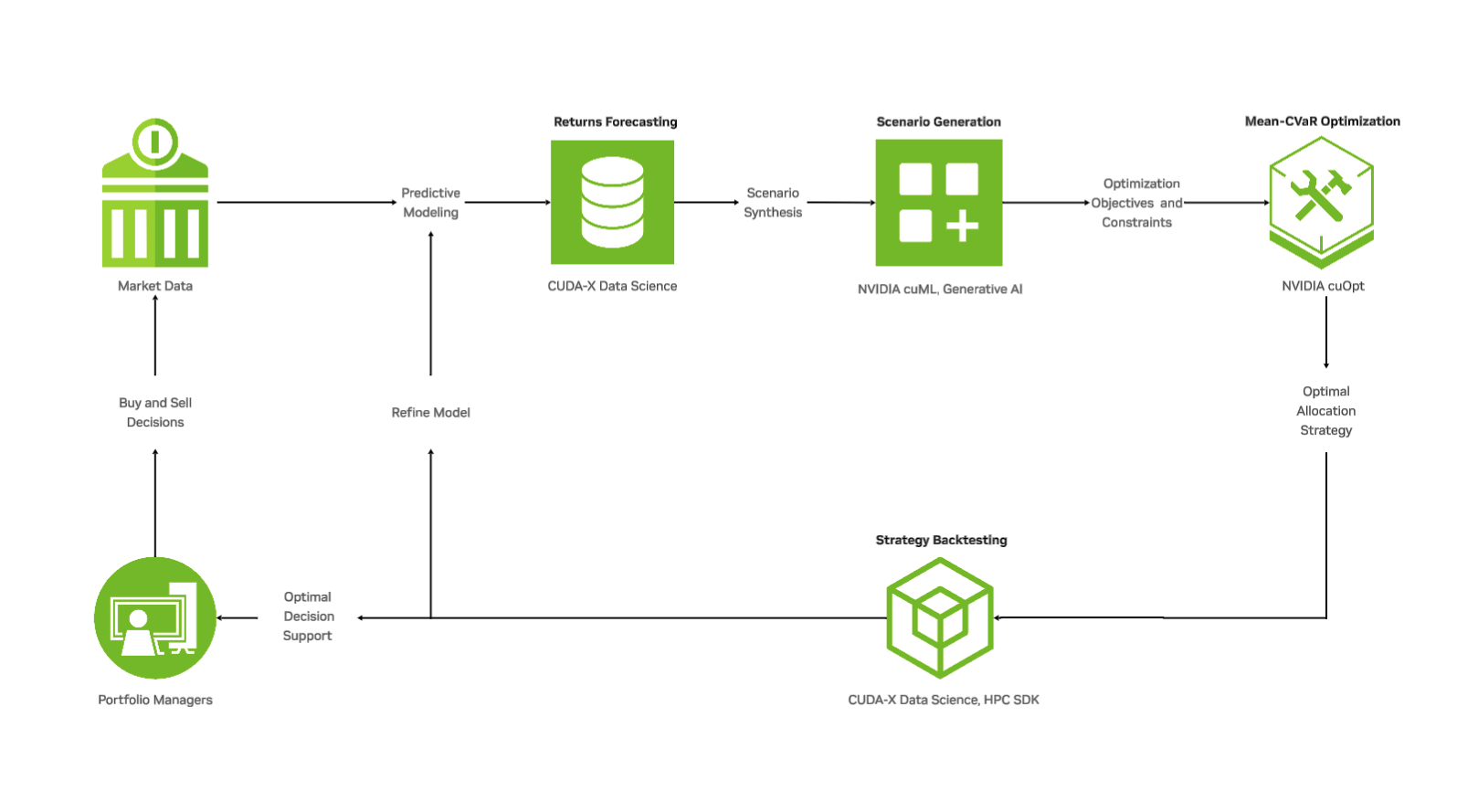
cvar_basic.ipynb is a complete portfolio optimization walkthrough Jupyter notebook that demonstrates GPU-accelerated portfolio optimization techniques using the NVIDIA DGX Spark. It primarily uses the new purpose built library cuFolio, which is built upon NVIDIA's cuOpt, and NVIDIA RAPIDS' cuML and cuGraph.
CLICK HERE TO GET STARTED
This notebook's step-by-step walkthrough covers:
- Data preparation and preprocessing
- Scenario generation
- Mean-CVaR (Conditional Value-at-Risk) portfolio optimization
- Implementing real-world constraints (concentration limits, leverage, turnover)
- Portfolio construction and analysis
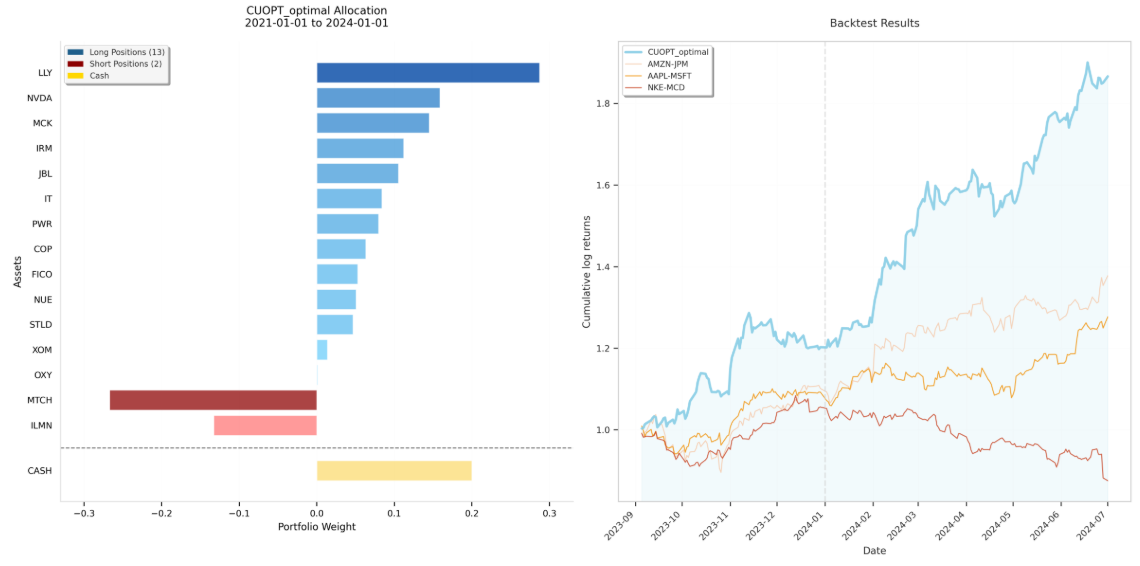
- Performance evaluation and backtesting
If you'd like a deep dive into the notebook itself, check out the blog: Accelerating Real-Time Financial Decisions with Quantitative Portfolio Optimization
Be sure to run the notebook using the Portfolio Optimization Kernel! Instructions will be at the start of the notebook.
Downloaded stock data will be stored in the data. Calcuated results are saved in the results folder.
DIY Installation
Installing the Portfolio Optimization packages can be moderately complexity, so we created some scripts to make it easy to build the Python environment.
You will need RAPIDS 25.10 and Jupyter installed using either pip/uv or docker. Please refer to the RAPIDS Installation Selector for more details.
Examples:
pip install "cudf-cu13==25.10.*" "cuml-cu13==25.10.*" jupyterlab
or
docker run --gpus all --pull always --rm -it \
    --shm-size=1g --ulimit memlock=-1 --ulimit stack=67108864 \
    -p 8888:8888 -p 8787:8787 -p 8786:8786 \
    nvcr.io/nvidia/rapidsai/notebooks:25.10-cuda13-py3.13
Once RAPIDS is installed, please run the commands below to install the Portfolio Optimization Jupyter Kernel. If you are in Docker, please run these inside of the Docker environment.
cd Stock_Portfolio_Optimization
# Install uv (if not already installed)
curl -LsSf https://astral.sh/uv/install.sh | sh

# To add $HOME/.local/bin to your PATH, either restart your shell or run:
source $HOME/.local/bin/env

# Install with CUDA-specific dependencies
uv sync --extra cuda13

# Optional: Install development tools
# uv sync --extra cuda13 --extra dev

# Create a Jupyter kernel for this environment
uv run python -m ipykernel install --user --name=portfolio-opt --display-name "Portfolio Optimization"

# Launch Jupyter Lab (if necessary)
uv run jupyter lab --no-browser --NotebookApp.token=''
Next Steps
Advanced Workflows at NVIDIA AI Blueprints
Once you're comfortable with the basic workflow, explore these advanced topics in any order at the NVIDIA AI Blueprints:
efficient_frontier.ipynb - Efficient Frontier Analysis
This notebook demonstrates how to:
- Generate the efficient frontier by solving multiple optimization problems
- Visualize the risk-return tradeoff across different portfolio configurations
- Compare portfolios along the efficient frontier
- Leverage GPU acceleration to quickly compute multiple optimal portfolios
rebalancing_strategies.ipynb - Dynamic Portfolio Rebalancing
This notebook introduces dynamic portfolio management techniques:
- Time-series backtesting framework
- Testing various rebalancing strategies (periodic, threshold-based, etc.)
- Evaluating the impact of transaction costs on portfolio performance
- Analyzing strategy performance over different market conditions
- Comparing multiple rebalancing approaches
Additional Resources
If you'd further learn how to formulate portfolio optimization problems using similar risk–return frameworks, check out the DLI course: Accelerating Portfolio Optimization
For questions or issues, please visit: