 8839075805
Implements Phases 1-8 of the TFTSR implementation plan. Rust backend (Tauri 2.x, src-tauri/): - Multi-provider AI: OpenAI-compatible, Anthropic, Gemini, Mistral, Ollama - PII detection engine: 11 regex patterns with overlap resolution - SQLCipher AES-256 encrypted database with 10 versioned migrations - 28 Tauri IPC commands for triage, analysis, document, and system ops - Ollama: hardware probe, model recommendations, pull/delete with events - RCA and blameless post-mortem Markdown document generators - PDF export via printpdf - Audit log: SHA-256 hash of every external data send - Integration stubs for Confluence, ServiceNow, Azure DevOps (v0.2) Frontend (React 18 + TypeScript + Vite, src/): - 9 pages: full triage workflow NewIssue→LogUpload→Triage→Resolution→RCA→Postmortem→History+Settings - 7 components: ChatWindow, TriageProgress, PiiDiffViewer, DocEditor, HardwareReport, ModelSelector, UI primitives - 3 Zustand stores: session, settings (persisted), history - Type-safe tauriCommands.ts matching Rust backend types exactly - 8 IT domain system prompts (Linux, Windows, Network, K8s, DB, Virt, HW, Obs) DevOps: - .woodpecker/test.yml: rustfmt, clippy, cargo test, tsc, vitest on every push - .woodpecker/release.yml: linux/amd64 + linux/arm64 builds, Gogs release upload Verified: - cargo check: zero errors - tsc --noEmit: zero errors - vitest run: 13/13 unit tests passing Co-Authored-By: Claude Sonnet 4.6 (1M context) <noreply@anthropic.com> |
||
|---|---|---|
| .. | ||
| assets | ||
| bin | ||
| build | ||
| node_modules | ||
| LICENSE | ||
| package.json | ||
| README.md | ||
WebdriverIO Starter Toolkit 

One command to create a fresh WebdriverIO project or add WebdriverIO to an existing project.
- Get Started Guide - How to get started with WebdriverIO
- Supported Options - command line parameters
create-wdio works on macOS, Windows, and Linux.
If something doesn’t work, please file an issue.
If you have questions or need help, please ask in our Discord Support channel.
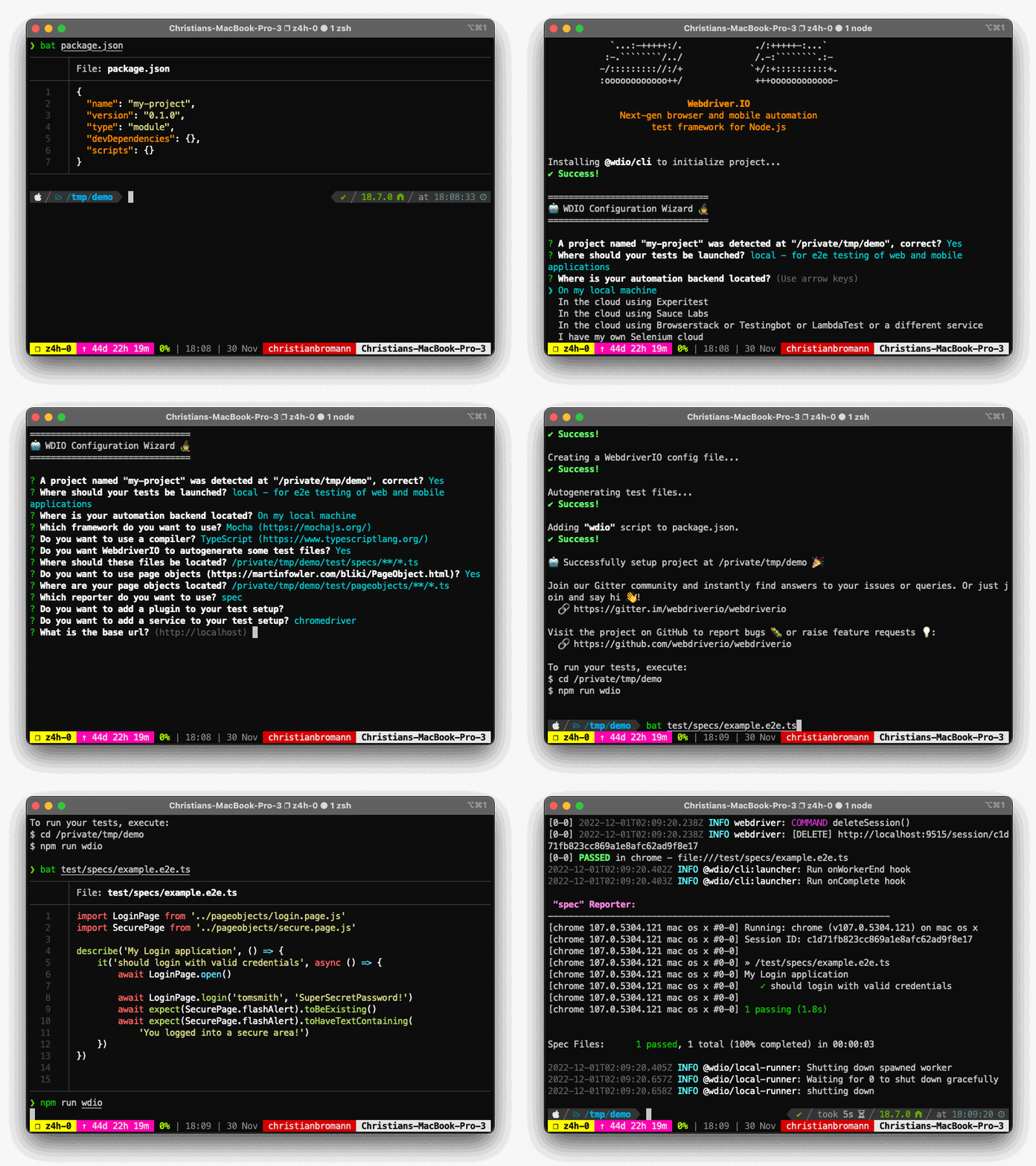
Usage
To install a WebdriverIO project, you may choose one of the following methods:
npx
npx create-wdio@latest ./e2e
npx is a package runner tool that comes with npm 5.2+ and higher, see instructions for older npm versions
npm
npm init wdio@latest ./e2e
npm init <initializer> is available in npm 6+
yarn
yarn create wdio@latest ./e2e
yarn create <starter-kit-package> is available in Yarn 0.25+
pnpm
pnpm create wdio ./e2e
pnpm create <starter-kit-package> is available in pnpm v7+
It will create a directory called e2e inside the current folder.
Then it will run the configuration wizard that will help you set-up your framework.
Supported Options
You can pass the following command line flags to modify the bootstrap mechanism:
--dev- Install all packages asdevDependencies(default:true)--yes- Will fill in all config defaults without prompting (default:false)--npm-tag- use a specific NPM tag for@wdio/clipackage (default:latest)
For more information on WebdriverIO see the homepage.