| .. | ||
| .cursor/rules | ||
| deploy | ||
| examples | ||
| frontend | ||
| scripts | ||
| .dockerignore | ||
| .gitignore | ||
| LICENSE | ||
| README.md | ||
| start.sh | ||
| stop.sh | ||

NVIDIA txt2kg
Overview
This playbook serves as a reference solution for knowledge graph extraction and querying with Retrieval Augmented Generation (RAG). This txt2kg playbook extracts knowledge triples from text and constructs a knowledge graph for visualization and querying, creating a more structured form of information retrieval compared to traditional RAG approaches. By leveraging graph databases and entity relationships, this playbook delivers more contextually rich answers that better represent complex relationships in your data.
📋 Table of Contents
By default, this playbook leverages Ollama for local LLM inference, providing a fully self-contained solution that runs entirely on your own hardware. You can optionally use vLLM for GPU-accelerated inference on DGX Spark/GB300, or NVIDIA-hosted models available in the NVIDIA API Catalog for advanced capabilities.
Key Features
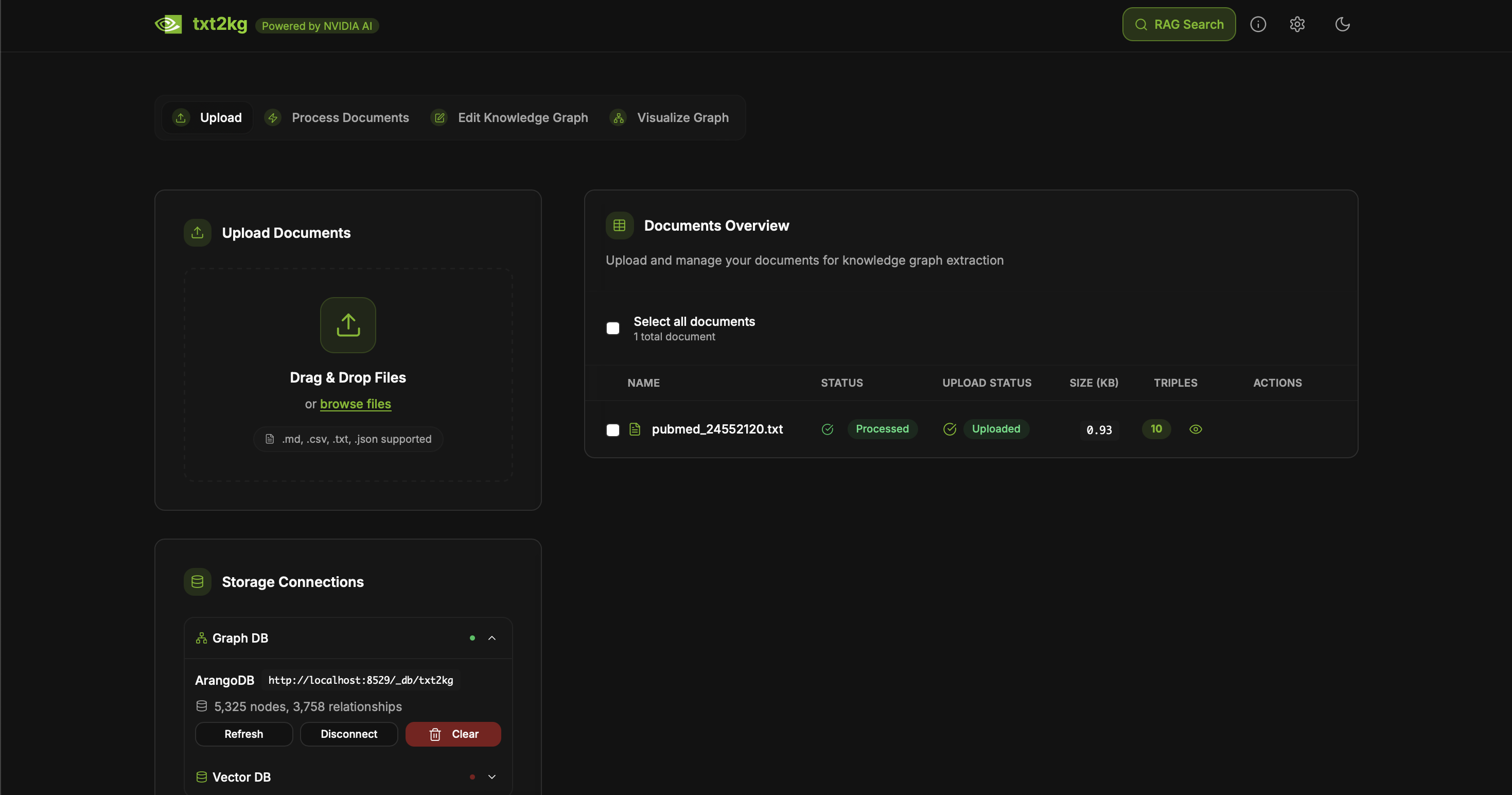
- Knowledge triple extraction from text documents
- Knowledge graph construction and visualization
- Local-first architecture with Ollama for LLM inference
- Graph database integration with ArangoDB
- Interactive knowledge graph visualization with Three.js WebGPU
- GPU-accelerated LLM inference with Ollama
- Fully containerized deployment with Docker Compose
- Optional NVIDIA API integration for cloud-based models
- Optional vector search with Qdrant for semantic similarity
- Optional graph-based RAG for contextual answers
Software Components
Core Components (Default)
- LLM Inference
- Ollama: Local LLM inference with GPU acceleration
- Default model:
llama3.1:8b - Supports any Ollama-compatible model
- Default model:
- Ollama: Local LLM inference with GPU acceleration
- Knowledge Graph Database
- ArangoDB: Graph database for storing knowledge triples (entities and relationships)
- Web interface on port 8529
- No authentication required (configurable)
- ArangoDB: Graph database for storing knowledge triples (entities and relationships)
- Graph Visualization
- Three.js WebGPU: Client-side GPU-accelerated graph rendering
- Frontend & API
- Next.js: Modern React framework with API routes
Optional Components
- vLLM Stack (with
--vllmflag)- vLLM: GPU-accelerated LLM inference optimized for DGX Spark/GB300
- Default model:
nvidia/Llama-3_3-Nemotron-Super-49B-v1_5-FP8
- Default model:
- Neo4j: Alternative graph database
- vLLM: GPU-accelerated LLM inference optimized for DGX Spark/GB300
- Vector Database & Embedding (with
--vector-searchflag)- SentenceTransformer: Local embedding generation (model:
all-MiniLM-L6-v2) - Qdrant: Self-hosted vector storage and similarity search
- SentenceTransformer: Local embedding generation (model:
- Cloud Models (configure separately)
- NVIDIA API: Cloud-based models via NVIDIA API Catalog
Technical Diagram
Default Architecture (Minimal Setup)
The core workflow for knowledge graph building and visualization:
- User uploads documents through the txt2kg web UI
- Documents are processed and chunked for analysis
- Ollama extracts knowledge triples (subject-predicate-object) from the text using local LLM inference
- Triples are stored in ArangoDB graph database
- Knowledge graph is visualized with Three.js WebGPU rendering in the browser
- Users can query the graph and generate insights using Ollama
Future Enhancements
Additional capabilities can be added:
- Vector search: Add semantic similarity search with Qdrant and SentenceTransformer embeddings
- S3 storage: MinIO for scalable document storage
- GNN-based GraphRAG: Graph Neural Networks for enhanced retrieval
GPU-Accelerated LLM Inference
This playbook includes GPU-accelerated LLM inference with Ollama:
Ollama Features (Default)
- Fully local inference: No cloud dependencies or API keys required
- GPU acceleration: Automatic CUDA support with NVIDIA GPUs
- Multiple model support: Use any Ollama-compatible model
- Optimized inference: Flash attention, KV cache optimization, and quantization
- Easy model management: Pull and switch models with simple commands
- Privacy-first: All data processing happens on your hardware
vLLM Alternative (via --vllm flag)
- High-performance inference: Optimized for DGX Spark/GB300 unified memory
- FP8 quantization: Efficient memory usage with minimal quality loss
- Large context support: Up to 32K tokens context length
- Continuous batching: High throughput for multiple requests
Default Ollama Configuration
- Model:
llama3.1:8b - GPU memory fraction: 0.9 (90% of available VRAM)
- Flash attention enabled
- Q8_0 KV cache for memory efficiency
Software Requirements
- CUDA 12.0+
- Docker with NVIDIA Container Toolkit
Deployment Guide
Environment Variables
No API keys required for default deployment! All services run locally.
The default configuration uses:
- Local Ollama (no API key needed)
- Local ArangoDB (no authentication by default)
Optional environment variables for customization:
# Ollama configuration (optional - defaults are set)
OLLAMA_BASE_URL=http://ollama:11434/v1
OLLAMA_MODEL=llama3.1:8b

# NVIDIA API (optional - for cloud models)
NVIDIA_API_KEY=your-nvidia-api-key
Quick Start
- Clone the repository:
git clone <repository-url>
cd txt2kg
- Start the application:
./start.sh
That's it! No configuration needed. The script will:
- Start all required services with Docker Compose
- Set up ArangoDB database
- Launch Ollama with GPU acceleration
- Start the Next.js frontend
- Pull an Ollama model (first time only):
docker exec ollama-compose ollama pull llama3.1:8b
- Access the application:
- Web UI: http://localhost:3001
- ArangoDB: http://localhost:8529 (no authentication required)
- Ollama API: http://localhost:11434
Alternative: Using vLLM (for DGX Spark/GB300)
For GPU-accelerated inference with vLLM:
./start.sh --vllm
Then wait for vLLM to load the model:
docker logs vllm-service -f
Services:
- Web UI: http://localhost:3001
- Neo4j Browser: http://localhost:7474 (user:
neo4j, password:password123) - vLLM API: http://localhost:8001
Adding Vector Search
Enable semantic similarity search:
./start.sh --vector-search
This adds:
- Qdrant: http://localhost:6333
- Sentence Transformers: http://localhost:8000
Available Customizations
- Switch LLM backend: Use
--vllmflag for vLLM or default for Ollama - Add vector search: Use
--vector-searchflag for Qdrant + embeddings - Switch Ollama models: Use any model from Ollama's library (Llama, Mistral, Qwen, etc.)
- Modify extraction prompts: Customize how triples are extracted from text
- Add domain-specific knowledge sources: Integrate external ontologies or taxonomies
- Use NVIDIA API: Connect to cloud models for specific use cases
License
This project will download and install additional third-party open source software projects and containers.