| .. | ||
| flux_assets | ||
| flux_data | ||
| models | ||
| workflows | ||
| Dockerfile.inference | ||
| Dockerfile.train | ||
| download.sh | ||
| launch_comfyui.sh | ||
| launch_train.sh | ||
| README.md | ||

FLUX.1 Fine-tuning with LoRA
This project demonstrates fine-tuning the FLUX.1-dev 12B model using Dreambooth LoRA (Low-Rank Adaptation) for custom image generation. The demo includes training on custom concepts and inference through both command-line scripts and ComfyUI.
Overview
The project includes:
- FLUX.1-dev Fine-tuning: LoRA-based fine-tuning
- Custom Concept Training: Train on "tjtoy" toy and "sparkgpu" GPU
- Command-line Inference: Generate images using trained LoRA weights
- ComfyUI Integration: Intuitive workflows for inference with custom models
- Docker Support: Complete containerized environment
Contents
1. Model Download
1.1 Huggingface Authentication
You will have to be granted access to the FLUX.1-dev model since it is gated. Go to their model card, to accept the terms and gain access to the checkpoints.
If you do not have a HF_TOKEN already, follow the instructions here to generate one. Authenticate your system by replacing your generated token in the following command.
export HF_TOKEN=<YOUR_HF_TOKEN>
1.2 Download the pre-trained checkpoints
cd flux-finetuning/assets

# script to download (can take about a total of 15-60 mins, based on your internet speed)
sh download.sh
The following snippet downloads the required FLUX models for training and inference.
flux1-dev.safetensors(~23.8GB)ae.safetensors(~335MB)clip_l.safetensors(~246MB)t5xxl_fp16.safetensors(~9.8GB)
Verify that your models/ directory follows this structure after downloading the checkpoints.
models/
├── checkpoints/
│   └── flux1-dev.safetensors
├── loras/
├── text_encoders/
│   ├── clip_l.safetensors
│   └── t5xxl_fp16.safetensors
└── vae/
    └── ae.safetensors
1.3 (Optional) Using fine-tuned checkpoints
If you already have fine-tuned LoRAs, place them inside models/loras. If you do not have one yet, proceed to the Training section for more details.
2. Base Model Inference
Let's begin by generating an image using the base FLUX.1 model on 2 concepts we am interested in, Toy Jensen and DGX Spark.
2.1 Spin up the docker container
# Build the inference docker image
docker build -f Dockerfile.inference -t flux-comfyui .

# Launch the ComfyUI container (ensure you are inside flux-finetuning/assets)
# You can ignore any import errors for `torchaudio`
sh launch_comfyui.sh
Access ComfyUI at http://localhost:8188 to generate images with the base model. Do not select any pre-existing template.
2.2 Load the base workflow
Find the workflow section on the left-side panel of ComfyUI (or press w). Upon opening it, you should find two existing workflows loaded up. For the base Flux model, let's load the base_flux.json workflow. After loading the json, you should see ComfyUI load up the workflow.
2.3 Fill in the prompt for your generation
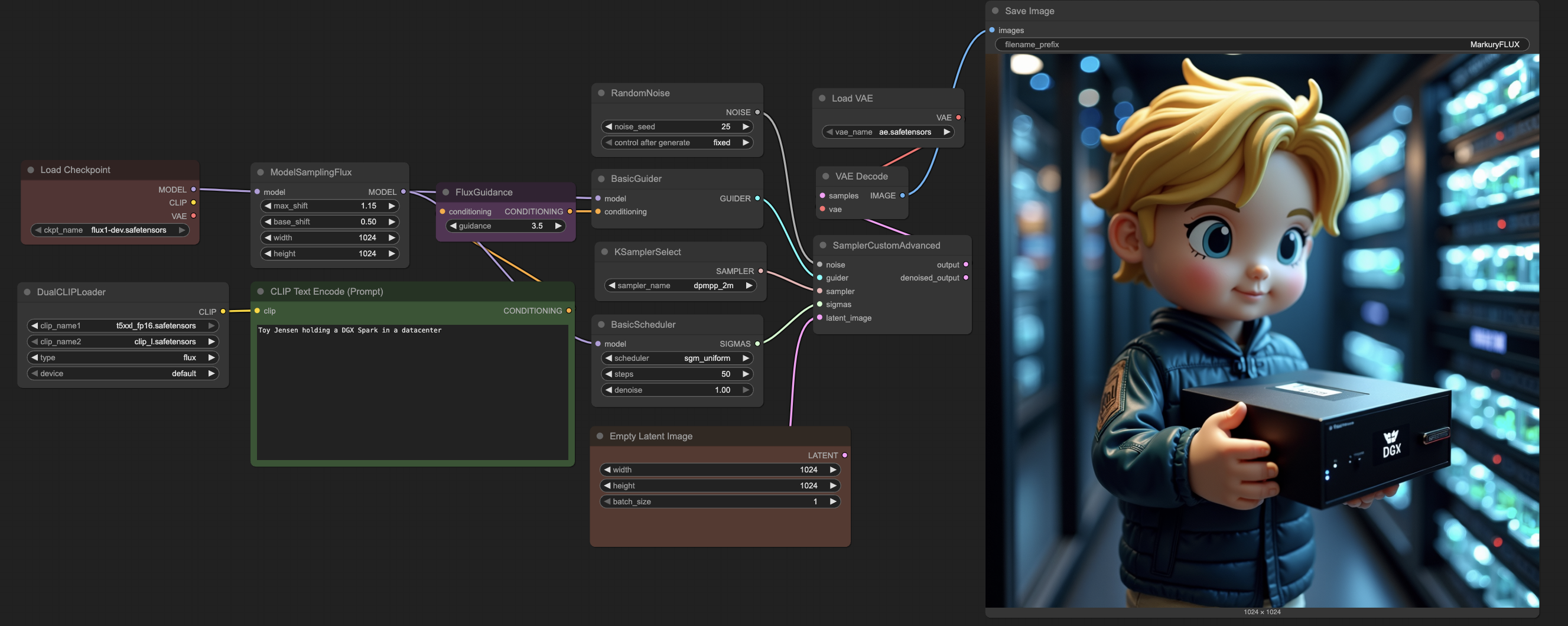
Provide your prompt in the CLIP Text Encode (Prompt) block. For example, we will use Toy Jensen holding a DGX Spark in a datacenter. You can expect the generation to take ~3 mins since it is compute intesive to create high-resolution 1024px images.
For the provided prompt and random seed, the base Flux model generated the following image. Although the generation has good quality, it fails to understand the custom characters and concepts we would like to generate.
After playing around with the base model, you have 2 possible next steps.
- If you already have fine-tuned LoRAs placed inside
models/loras/, please skip to Load the finetuned workflow section. - If you wish to train a LoRA for your custom concepts, first make sure that the ComfyUI inference container is brought down before proceeding to train. You can bring it by interrupting the terminal with
Ctrl+Ckeystroke.
Note
: To clear out any extra occupied memory from your system, execute the following command outside the container after interrupting the ComfyUI server.
sudo sh -c 'sync; echo 3 > /proc/sys/vm/drop_caches'
3. Dataset Preparation
Let's prepare our dataset to perform Dreambooth LoRA finetuning on the FLUX.1-dev 12B model. However, if you wish to continue with the provided dataset of Toy Jensen and DGX Spark, feel free to skip to the Training section. This dataset is a collection of public assets accessible via Google Images.
3.1 Data collection
You will need to prepare a dataset of all the concepts you would like to generate, and about 5-10 images for each concept. For this example, we would like to generate images with 2 concepts.
TJToy Concept
- Trigger phrase:
tjtoy toy - Training images: 6 high-quality images of custom toy figures
- Use case: Generate images featuring the specific toy character in various scenes
SparkGPU Concept
- Trigger phrase:
sparkgpu gpu - Training images: 7 images of custom GPU hardware
- Use case: Generate images featuring the specific GPU design in different contexts
3.2 Format the dataset
Create a folder for each concept with it's corresponding name, and place it inside the flux_data directory. In our case, we have used sparkgpu and tjtoy as our concepts, and placed a few images inside each of them. After preparing the dataset, the structure inside flux_data should mimic the following.
flux_data/
├── data.toml
├── concept_1/
│   ├── 1.png
│   ├── 2.jpg
    └── ...
└── concept_2/
    ├── 1.jpeg
    ├── 2.jpg
    └── ...
3.3 Update the data config
Now, let's modify the flux_data/data.toml file to reflect the concepts chosen. Ensure that you update/create entries for each of your concept, by modifying the image_dir and class_tokens fields under [[datasets.subsets]]. For better performance in finetuning, it is a good practice to append a class token to your concept name (like toy or gpu).
4. Training
4.1 Build the docker image
# Build the inference docker image
docker build -f Dockerfile.train -t flux-train .
4.2 Setup the training command
Launch training by executing the follow command. The training script is setup to use a default configuration that can generate reasonable images for your dataset, in about ~90 mins of training. This train command will automatically store checkpoints in the models/loras/ directory.
sh launch_train.sh
If you wish to generate very-quality images on your custom concepts (like the images we have shown in the README), you will have to train for much longer (~4 hours). To accomplish this, modify the num epochs in the launch_train.sh script to 100.
--max_train_epochs=100
Feel free to play around with the other hyperparameters in the launch_train.sh script to find the best settings for your dataset. Some notable parameters to tune include:
- Network Type: LoRA with dimension 256
- Learning Rate: 1.0 (with Prodigy optimizer)
- Epochs: 100 (saves every 25 epochs)
- Resolution: 1024x1024
- Mixed Precision: bfloat16
- Optimizations: Torch compile, gradient checkpointing, cached latents
5. Finetuned Model Inference
Now let's generate images using our finetuned LoRAs!
5.1 Spin up the docker container
# Build the inference docker image, if you haven't already
docker build -f Dockerfile.inference -t flux-comfyui .

# Launch the ComfyUI container (ensure you are inside flux-finetuning/assets)
# You can ignore any import errors for `torchaudio`
sh launch_comfyui.sh
Access ComfyUI at http://localhost:8188 to generate images with the finetuned model. Do not select any pre-existing template.
5.2 Load the finetuned workflow
Find the workflow section on the left-side panel of ComfyUI (or press w). Upon opening it, you should find two existing workflows loaded up. For the finetuned Flux model, let's load the finetuned_flux.json workflow. After loading the json, you should see ComfyUI load up the workflow.
5.3 Fill in the prompt for your generation
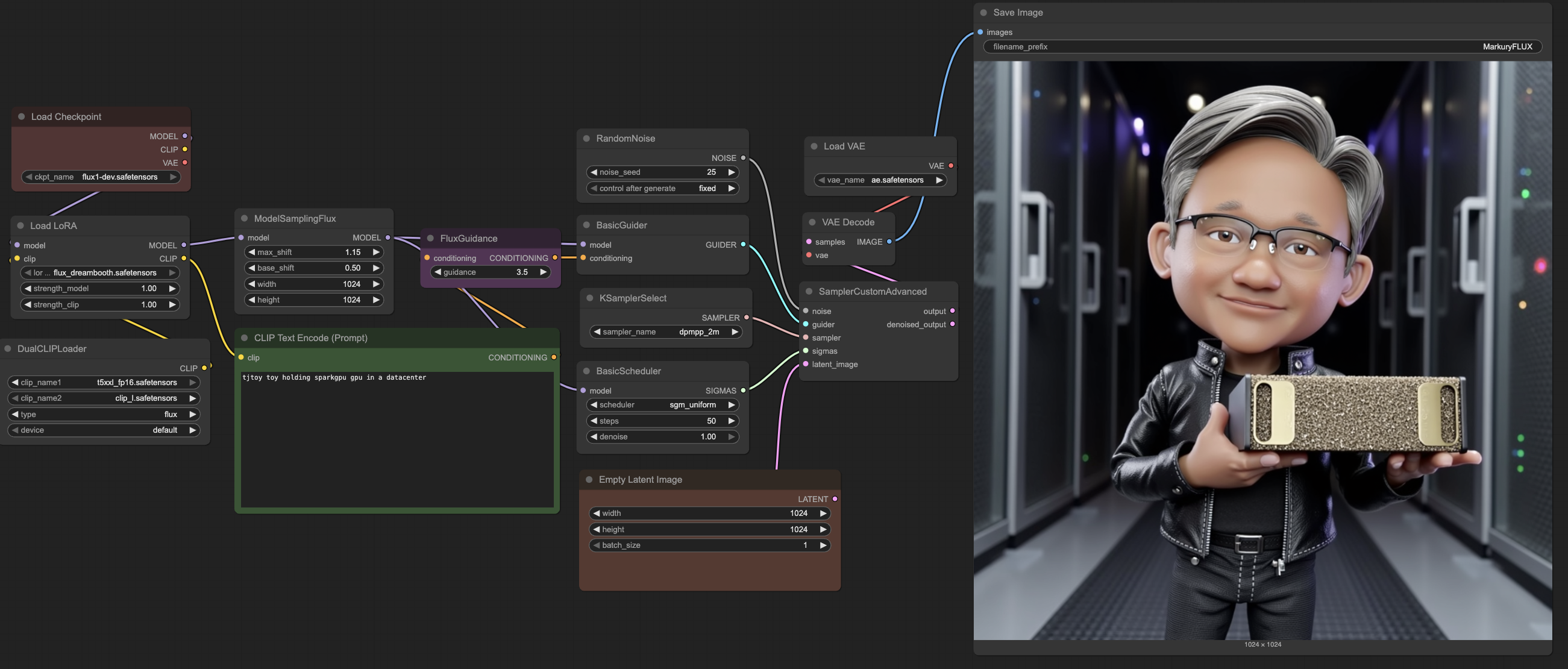
Provide your prompt in the CLIP Text Encode (Prompt) block. Now let's incorporate our custom concepts into our prompt for the finetuned model. For example, we will use tjtoy toy holding sparkgpu gpu in a datacenter. You can expect the generation to take ~3 mins since it is compute intesive to create high-resolution 1024px images.
For the provided prompt and random seed, the finetuned Flux model generated the following image. Unlike the base model, we can see that the finetuned model can generate multiple concepts in a single image.
5.4 (Optional) Tuning your generations
ComfyUI exposes several fields to tune and change the look and feel of the generated images. Here are some parameters to look out for in the workflow.
- LoRA weights: Change your trained LoRA file in the
Load LoRAplugin, and even tune its strengths - Adjust resolution: Modify the width and height in the
Empty Latent Imageplugin for other resolutions - Random seed: Change the noise seed in the
RandomNoiseplugin for alternative images with the same prompt - Tune sampling: Modify the sampler, scheduler and steps as necessary
Credits
This project uses the following open-source repositories:
- sd-scripts repository by
kohya-ssfor FLUX.1 fine-tuning. - ComfyUI repository by
comfyanonymousfor FLUX.1 inference.