# FLUX.1 Fine-tuning with LoRA
This project demonstrates fine-tuning the FLUX.1-dev 11B model using Dreambooth LoRA (Low-Rank Adaptation) for custom image generation. The demo includes training on custom concepts and inference through both command-line scripts and ComfyUI.
## Results
Fine-tuning FLUX.1 with custom concepts enables the model to generate images with your specific objects and styles:
Base FLUX.1 model without custom concept knowledge FLUX.1 model after LoRA fine-tuning with custom "tjtoy" and "sparkgpu" concepts
## Overview
The project includes:
- **FLUX.1-dev Fine-tuning**: LoRA-based fine-tuning using sd-scripts
- **Custom Concept Training**: Train on "tjtoy" toy and "sparkgpu" GPU
- **Command-line Inference**: Generate images using trained LoRA weights
- **ComfyUI Integration**: Intuitive workflows for inference with custom models
- **Docker Support**: Complete containerized environment
## Training
### 1. Build Docker Image by providing `HF_TOKEN`
```bash
# Build the Docker image (this will download FLUX models automatically)
docker build -f Dockerfile.train --build-arg HF_TOKEN=$HF_TOKEN -t flux-training .
```
**Note**: The Docker build automatically downloads the required FLUX models:
- `flux1-dev.safetensors` (~23GB)
- `ae.safetensors` (~335MB)
- `clip_l.safetensors` (~246MB)
- `t5xxl_fp16.safetensors` (~9.8GB)
### 2. Run Docker Container
```bash
# Run with GPU support and mount current directory
docker run -it \
--gpus all \
--ipc=host \
--ulimit memlock=-1 \
--ulimit stack=67108864 \
--net=host \
flux-training
```
### 3. Train the Model
```bash
# Inside the container, navigate to sd-scripts and run training
cd /workspace/sd-scripts
sh train.sh
```
### 4. Run Inference
The `inference.sh` script generates 9 images with different seeds.
After training, you can generate images using the learned concepts. For example:
- `"tjtoy toy"` - Your custom toy concept
- `"sparkgpu gpu"` - Your custom GPU concept
- Combine them: `"tjtoy toy holding sparkgpu gpu"`
```bash
# Generate images using the trained LoRA
sh inference.sh
```
### Dataset Structure
The training data is organized in the `data/` directory:
```
data/
├── data.toml # Training configuration
├── tjtoy/ # Custom toy concept images (6 images)
│ ├── 1.png
│ ├── 2.jpg
│ ├── 3.png
│ ├── 4.png
│ ├── 5.png
│ └── 6.png
└── sparkgpu/ # Custom GPU concept images (7 images)
├── 1.jpeg
├── 2.jpg
├── 3.jpg
├── 4.jpg
├── 6.png
├── 7.png
└── 8.png
```
### Training Parameters
Key training settings in `train.sh`:
- **Network Type**: LoRA with dimension 256
- **Learning Rate**: 1.0 (with Prodigy optimizer)
- **Epochs**: 100 (saves every 25 epochs)
- **Resolution**: 1024x1024
- **Mixed Precision**: bfloat16
- **Optimizations**: Torch compile, gradient checkpointing, cached latents
## ComfyUI
ComfyUI provides an intuitive visual interface for using your fine-tuned LoRA models. The beauty of LoRA fine-tuning is that you can easily add your custom concepts to any FLUX workflow with just a single node.
### 1. Build Docker Image by providing `HF_TOKEN`
```bash
# Build the Docker image (this will download FLUX models automatically)
docker build -f Dockerfile.inference --build-arg HF_TOKEN=$HF_TOKEN -t flux-comfyui .
```
### 2. Run Docker Container
```bash
# Run with GPU support and mount current directory
docker run -it \
--gpus all \
--ipc=host \
--ulimit memlock=-1 \
--ulimit stack=67108864 \
--net=host \
flux-comfyui
```
### 3. Running ComfyUI
```bash
# Start ComfyUI server
cd /workspace/ComfyUI
python main.py
```
Access ComfyUI at `http://localhost:8188`
### 4. ComfyUI Workflow Example
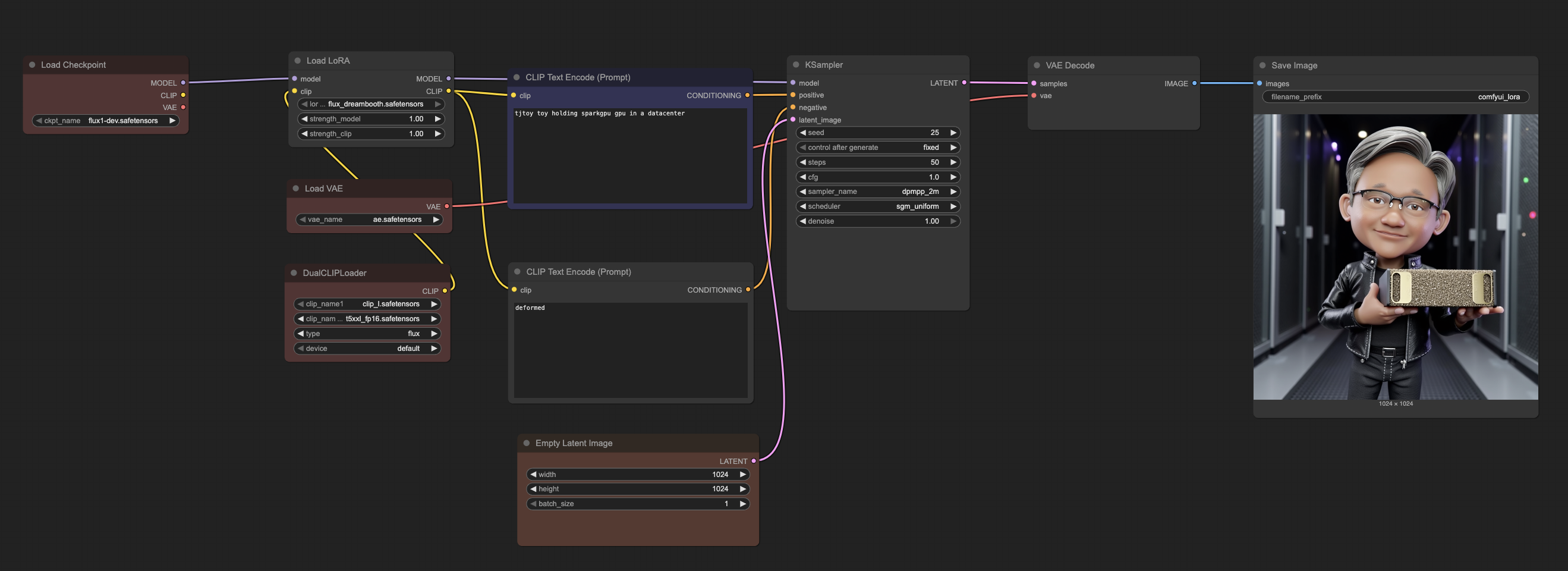
*ComfyUI workflow showing how easily LoRA can be integrated into the base FLUX model*
The workflow demonstrates the simplicity of LoRA integration:
1. **Load Checkpoint**: Base FLUX.1-dev model remains unchanged
2. **Load LoRA**: Simply add your trained LoRA file (`flux_dreambooth.safetensors`)
3. **Adjust Strength**: Fine-tune the influence of your custom concepts (0.8-1.2 typically works well)
4. **Generate**: Use your custom trigger words (`tjtoy toy`, `sparkgpu gpu`) in prompts
This modular approach means you can:
- **Preserve base model quality**: The original FLUX capabilities remain intact
- **Easy experimentation**: Quickly swap different LoRA models or adjust strengths
- **Combine concepts**: Mix multiple LoRA models or use them with other techniques
- **Minimal storage**: LoRA files are typically 100-200MB vs 23GB+ for full models
### ComfyUI Model Structure
Organize models in ComfyUI as follows:
```
ComfyUI/models/
├── checkpoints/
│ └── flux1-dev.safetensors # Main FLUX model
├── vae/
│ └── ae.safetensors # FLUX VAE
├── clip/
│ ├── clip_l.safetensors # CLIP text encoder
│ └── t5xxl_fp16.safetensors # T5 text encoder
└── loras/
└── flux_dreambooth.safetensors # Your trained LoRA
```
## Custom Concepts
The fine-tuning process teaches FLUX.1 to understand two custom concepts:
### TJToy Concept
- **Trigger phrase**: `tjtoy toy`
- **Training images**: 6 high-quality images of custom toy figures
- **Use case**: Generate images featuring the specific toy character in various scenes
### SparkGPU Concept
- **Trigger phrase**: `sparkgpu gpu`
- **Training images**: 7 images of custom GPU hardware
- **Use case**: Generate images featuring the specific GPU design in different contexts
### Combined Usage
You can combine both concepts in prompts:
- `"tjtoy toy holding sparkgpu gpu"`
- `"tjtoy toy standing next to sparkgpu gpu in a data center"`
- `"sparkgpu gpu being examined by tjtoy toy"`
## Credits
This project uses [sd-scripts](https://github.com/kohya-ss/sd-scripts) repository by `kohya-ss` for FLUX.1 fine-tuning.